New ISO 9001:2026 has published. Here's what changed →

AS9100D · AS9120B · AS9110C · ISO 9001:2015

Your co-pilot for quality, compliance, and continual improvement.

JBird holds the whole quality system in one place — your process map, your manual, your audits, your calibration recall, your corrective actions — and keeps them agreeing with each other. Built by someone who audits aerospace organizations for a living.

In active development — pilot organizations wanted
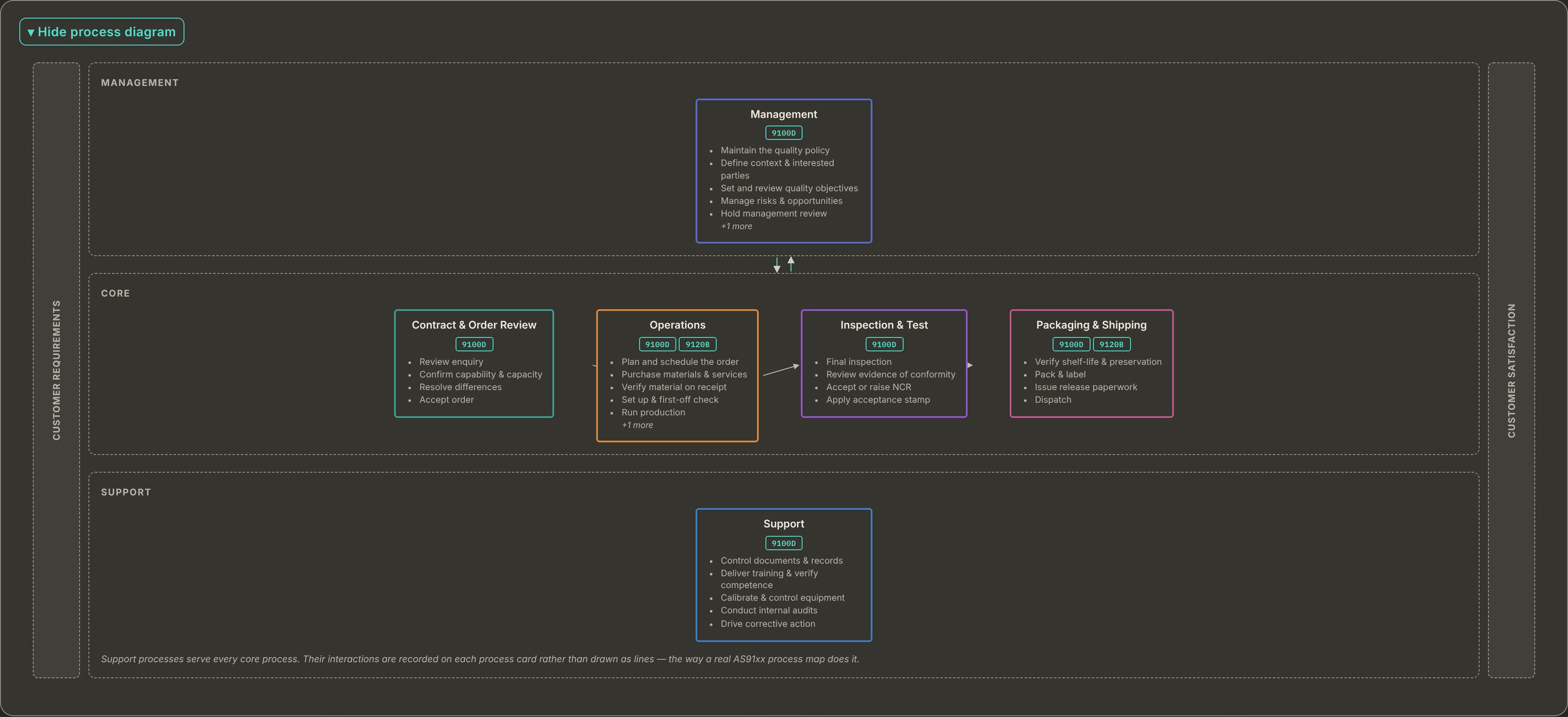
The JBird interaction-of-processes diagram: customer requirements and customer
                satisfaction bookending Management, Core and Support zones stacked top to
                bottom. One Management process above four core processes — contract and
                order review, operations, inspection and test, packaging and shipping —
                in a single left-to-right flow, with one Support process below. Each box lists
                its own activities as bullets.The JBird interaction-of-processes diagram: customer requirements and customer
                satisfaction bookending Management, Core and Support zones stacked top to
                bottom. One Management process above four core processes — contract and
                order review, operations, inspection and test, packaging and shipping —
                in a single left-to-right flow, with one Support process below. Each box lists
                its own activities as bullets.

The interaction of processes, drawn from your own data — not a stock diagram. Click to enlarge.

Video · 0:46A narrated walkthrough of this screen: The interaction of processes.
Read the narration

This is the interaction of processes in JBird. It is drawn from your own data, not copied from a stock diagram. Management sits above the core, with the activities it owns: the quality policy, quality objectives, risks and opportunities, and management review. Four core processes run left to right: contract and order review, operations, inspection and test, and packaging and shipping. Each box lists its own activities. Support is drawn as a real process below the core. Customer requirements come in on the left. Customer satisfaction goes out on the right. Drawn from your own data. JBird QMS.
One level down

The map shows what feeds what. The turtle shows how one process actually runs.

An interaction map earns its keep by staying readable, so it only has to answer one question: which process feeds the next. The moment you start hanging inputs, outputs, equipment and metrics off the arrows, nobody can follow it — and none of that detail belongs there anyway. It belongs in a turtle diagram or a SIPOC, one process at a time.

A note on how many processes you should have

Most quality systems are drawn with too many. Management Review, Context of the Organization, Risk & Opportunity, Quality Objectives and the Quality Policy are usually activities inside a Management process, not five processes. Document control, training, calibration, internal audit and corrective action are usually activities inside Support. And plenty of shops have no Purchasing process at all — it sits under Operations, because there is no purchasing manager.

A useful rule: if nobody is primarily employed to execute an activity, it is probably not a separate process. JBird lets you split one out when you really want to — it just doesn't push you into twelve processes on day one.

That rule is in the product, not just in this paragraph. JBird's archetype library states it before you pick a starting shape, and shows it landing on opposite answers about purchasing for a machine shop and a distributor, then on a separate answer again about design for a shop that employs engineers — the same rule, applied to whoever you actually employ. See how that works →

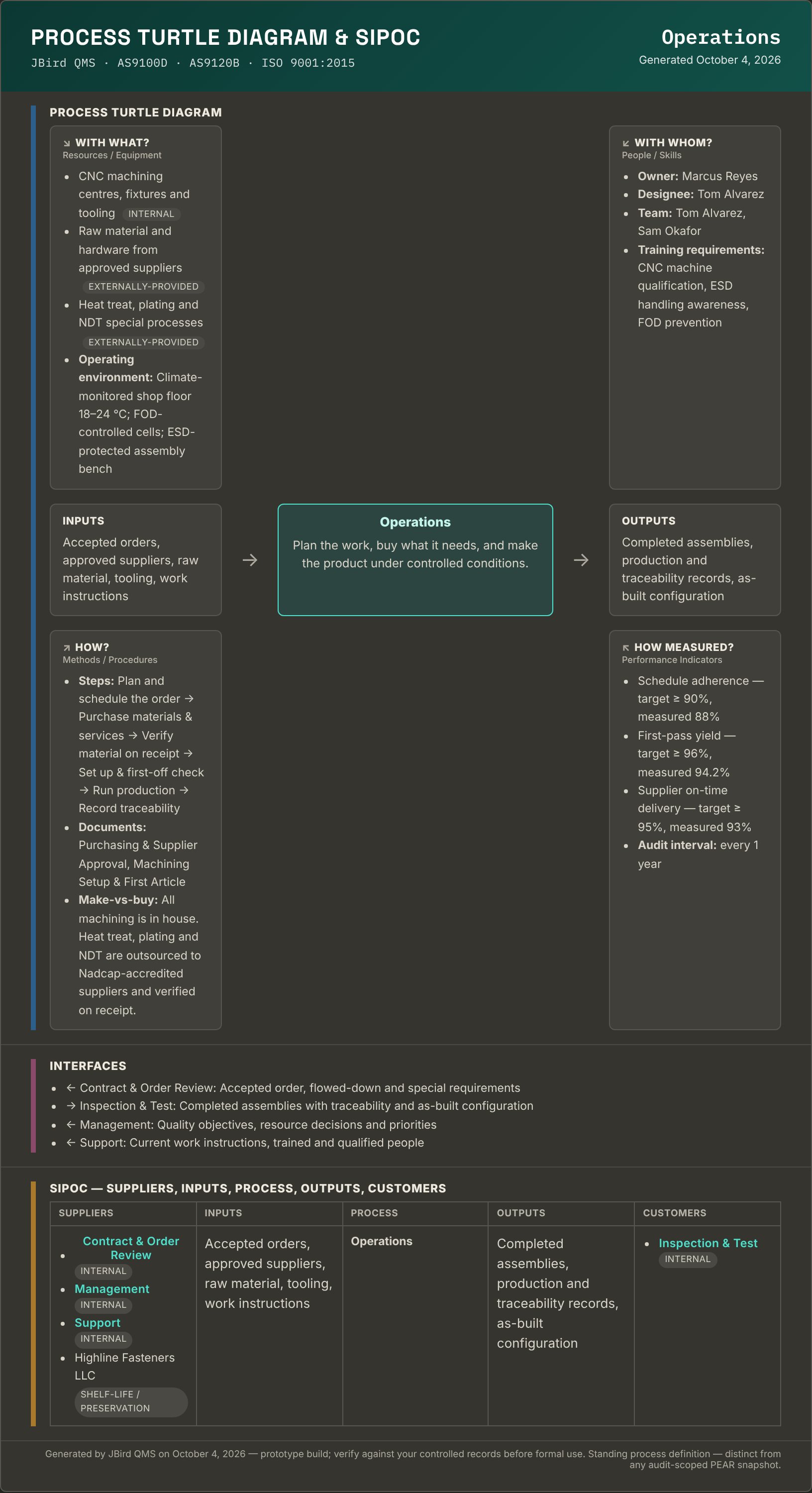
A JBird turtle diagram and SIPOC for the Operations process: With What,
                With Whom, Inputs, the process itself, Outputs, How and How Measured
                around a centre box; beneath it an Interfaces list naming each connected
                process with its direction and what flows; and a SIPOC table whose supplier
                and customer columns mix named external companies with upstream and
                downstream processes tagged Internal.A JBird turtle diagram and SIPOC for the Operations process: With What,
                With Whom, Inputs, the process itself, Outputs, How and How Measured
                around a centre box; beneath it an Interfaces list naming each connected
                process with its direction and what flows; and a SIPOC table whose supplier
                and customer columns mix named external companies with upstream and
                downstream processes tagged Internal.

One process: every turtle leg, its interfaces, and a SIPOC — all generated from records you already keep. Click to enlarge.

Video · 0:46A narrated walkthrough of this screen: A turtle diagram and SIPOC.
Read the narration

This is a turtle diagram for the Operations process, generated from records you already keep. With what is the equipment and operating environment. With whom is the owner, the team, and their training requirements. How is the sub-steps, plus the procedures tagged to the process. How measured is its KPIs, against their targets, and the audit interval. Below that, an interfaces list names each connected process, the direction, and what flows between them. And a SIPOC table, where suppliers and customers mix named companies with upstream and downstream processes, tagged internal. Nothing typed twice. JBird QMS.

Where the content comes from

Nothing on that page was typed twice. With what is the equipment and operating environment already on the process; with whom is the owner, designee and team from your people records, with their training requirements; how is the sub-steps plus the procedures and work instructions tagged to that process at their current revision; how measured is the KPIs and the audit interval. If a leg is empty, it says so — a thin process definition shows up as a gap you can find, rather than a blank box.

In the SIPOC, a supplier or customer you have actually linked — through shelf-life control, a calibration provider, a contract review — comes first by name. Where there is no real link yet, it falls back to the upstream or downstream process from your interaction map and marks it Internal, so the row is honest about which is which.

Between the two sits the process's interfaces — each one with its direction, the process on the other end, and what actually flows. That is there for a specific reason: the PEAR records a process’s inputs, activities and outputs, and interfaces are what make those specific, so the page an auditor reads is the page they can fill the form from.

Built against AS9100D AS9120B AS9110C ISO 9001:2015 IA9100 — ready for the revision

The problem

Most shops don't fail audits. They fail at finding the evidence.

The quality is usually fine. What's missing is one place where the manual, the process map, the audit record and the open corrective actions all agree with each other.

The manual is a Word file

Last revised by someone who left. Three versions float around the shared drive, and nobody is certain which one the auditor was handed last time.

The audit lives in a binder

Last year's findings, this year's checklist, and the effectiveness checks that were supposed to close them — in three places, none of them linked.

Corrective actions live in email

Root cause in one thread, containment in another, the objective evidence attached to a message from six weeks ago. The 30-day clock ran out quietly.

And the reason nobody fixes it

Most quality managers know all of this already. What stops them is the fortnight of retyping between deciding to move and having anything useful in the new system — every person, supplier, gage, document and open corrective action, keyed in by hand, on top of the day job.

So JBird imports them. A CSV out of whatever you keep now — people and training, suppliers, equipment and calibration, documents, NCR/CAPA history, customers — mapped to JBird's fields by you rather than guessed at, with a dry-run preview that shows what every row will do before a single record is written. A document with a historical approver and date gets a real dated approval record, not a badge with nothing behind it. See the import preview →

What's built

A 40-module QMS — 46 with Production — and they talk to each other.

JBird comes two ways: the quality system on its own is a 40-module build, and adding the optional Production / Operations set — bills of material, inventory, purchasing, routers, work orders and travelers — brings it to 46. Either way, define your processes once and the rest of the system inherits them. A process carries its own clauses, KPIs and owner — so an audit knows what to assess, the gap analysis knows what's covered, and a finding knows where it belongs.

Internal audit

Real IAQG 9101 methodology, not a checklist app

A QMS Process Matrix (9101 Form 2) marking every clause Conforming, Nonconforming, Not Evaluated or Not Applicable per audited process. A Process Effectiveness Assessment Report — the PEAR, 9101 Form 3 — for each one, scoring effectiveness from process realization and results.

  • PEAR inputs, activities, outputs and KPIs pull straight from the process map
  • Auditor's questionnaire generated per process from its documents and clauses
  • A standing personnel-awareness check against clause 7.3
  • Mark a clause nonconforming and it becomes a real NCR
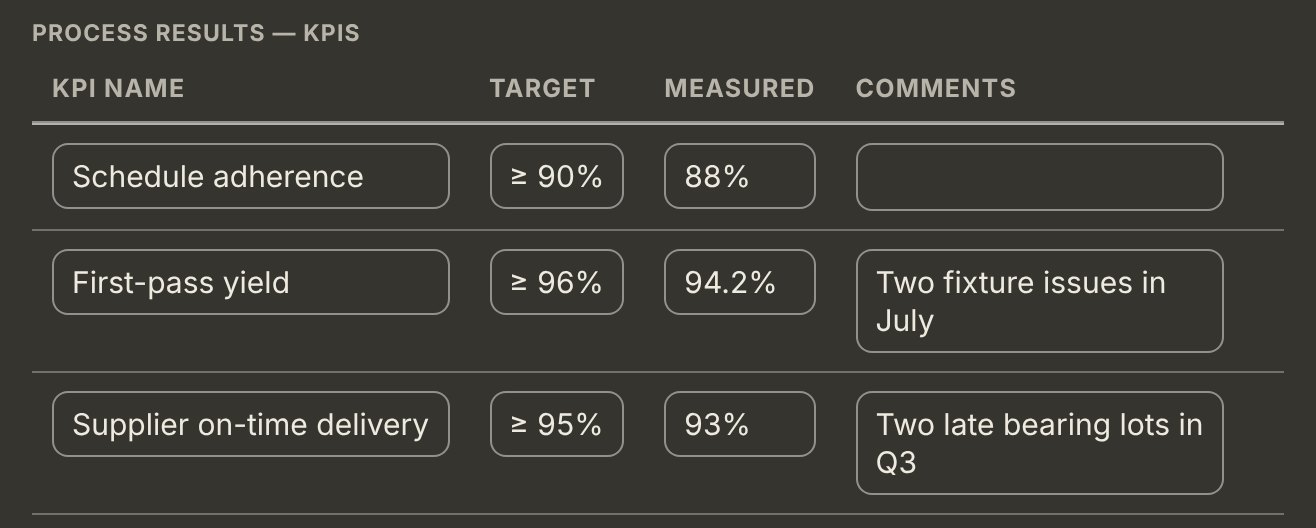
The KPI table from a PEAR in JBird: schedule adherence at 88% against a 90% target, first-pass yield 94.2% against 96%, and supplier on-time delivery 93% against 95%, with the auditor's comment on each shortfall.The KPI table from a PEAR in JBird: schedule adherence at 88% against a 90% target, first-pass yield 94.2% against 96%, and supplier on-time delivery 93% against 95%, with the auditor's comment on each shortfall.
Process results, measured against the targets the process map set. Click to enlarge.
Video · 0:38A narrated walkthrough of this screen: Process results against their targets.
Read the narration

This is the KPI table from a PEAR. Process results, measured against the targets the process map set. Schedule adherence. The target is 90%. Measured, 88%. First-pass yield. The target is 96%. Measured, 94.2%, with a comment: two fixture issues in July. Supplier on-time delivery. The target is 95%. Measured, 93%, with a comment: two late bearing lots in Q3. Results measured against targets. JBird QMS.

Readiness

Gap analysis that computes itself

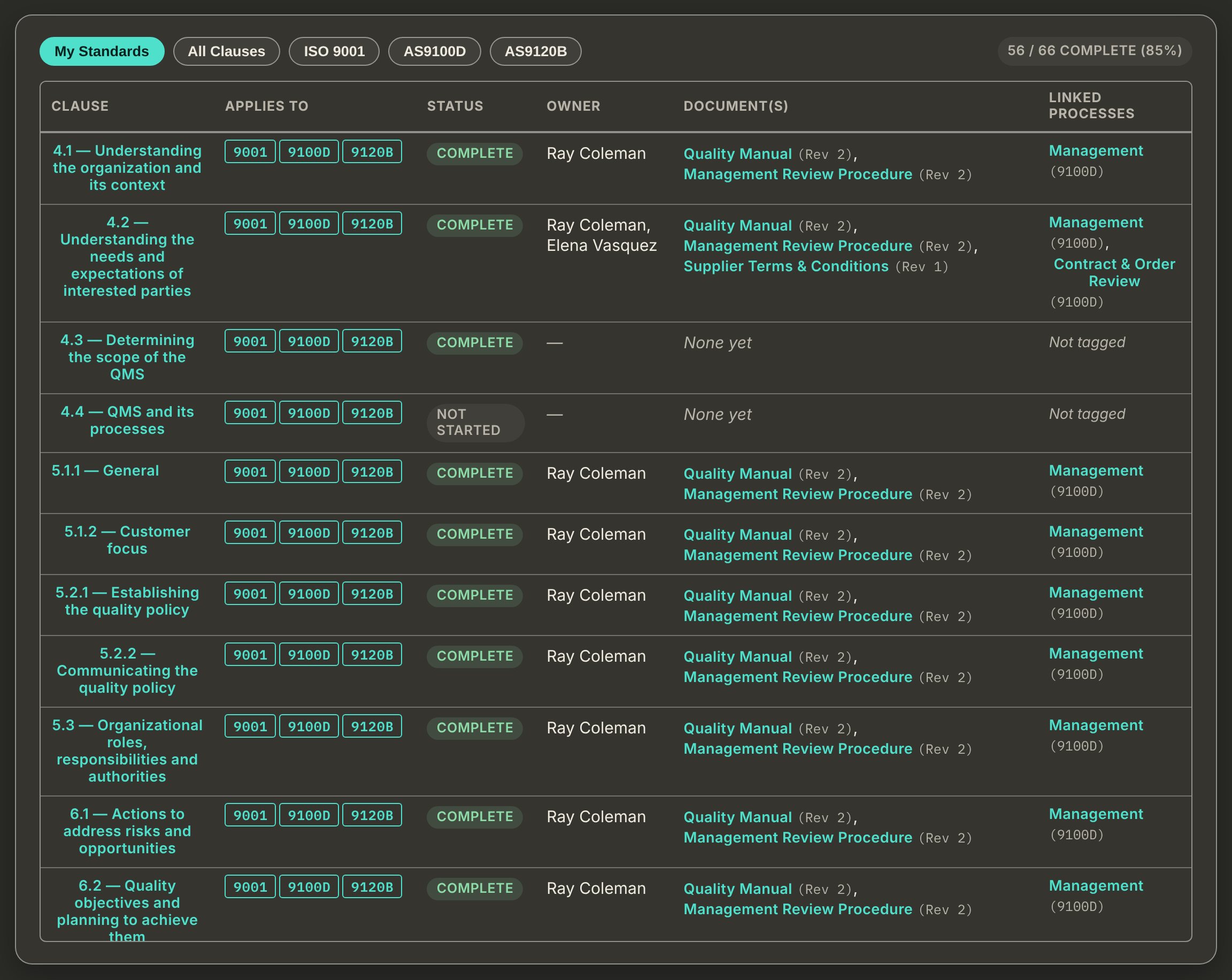
Every clause of every standard you're certified to, with its status derived from what actually exists in the system — which processes are tagged to it, which documents cover it, whether the clause summary has been written. Never a flag somebody remembered to set.

  • Filter to AS9100D, AS9120B, AS9110C or ISO 9001 alone
  • Owner, linked documents and linked processes on every clause
  • One readiness figure you can put in front of management review
JBird's clause-by-clause gap analysis table showing clause number,
                    applicable standards, status, owner, documents and linked processes.JBird's clause-by-clause gap analysis table showing clause number,
                    applicable standards, status, owner, documents and linked processes.
Video · 0:48A narrated walkthrough of this screen: The clause-by-clause gap analysis.
Read the narration

This is JBird's gap analysis. Every clause, the standards it applies to, its status, its owner, the documents behind it, and the processes it is linked to. Filter to your own standards, or see all clauses. The counter shows how many are complete: 56 of 66, 85%. Each clause shows which standards it applies to, whether it is complete or not started, and who owns it. Beside it, the controlled documents that satisfy the clause, at their current revision, and the process each clause is linked to. Where there is no document, or no owner, it says so. A gap you can find. Every clause, owned and evidenced. JBird QMS.

Measurement

Calibration control that knows what it invalidated

Due status is computed from the real calibration log, never a manual flag. Internal and external calibration sources, readings at multiple reference points, acceptance criteria, and a formal out-of-service quarantine log.

  • Recall list and due-soon warnings against clause 7.1.5.2
  • Out-of-tolerance findings assess impact on previous measurement results
  • An out-of-tolerance gage escalates to a real NCR in one click
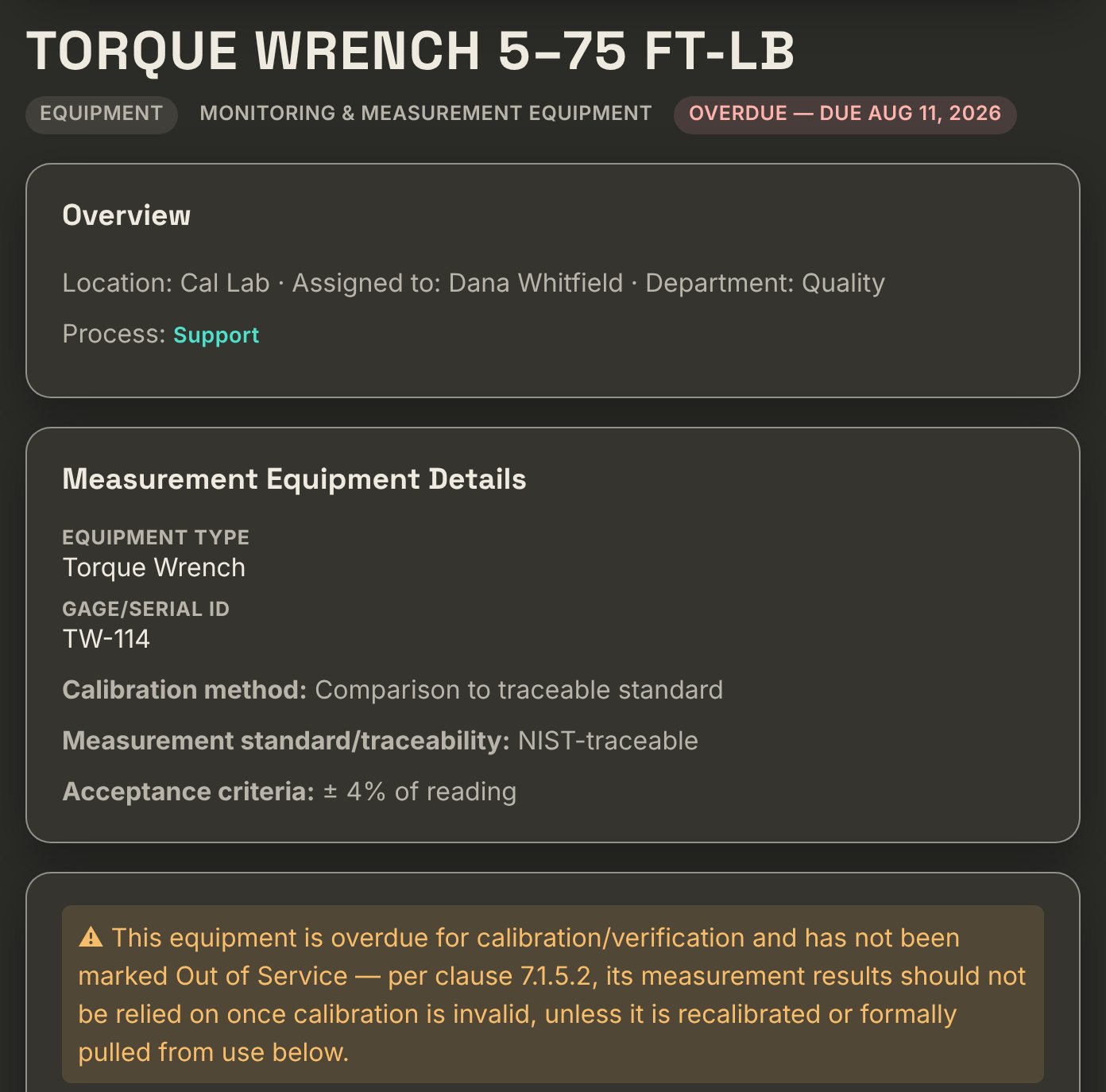
A torque wrench in JBird flagged Overdue with its due date, its gage ID, calibration method, NIST traceability and acceptance criteria, above a clause 7.1.5.2 warning that its measurement results should not be relied on until it is recalibrated or pulled from service.A torque wrench in JBird flagged Overdue with its due date, its gage ID, calibration method, NIST traceability and acceptance criteria, above a clause 7.1.5.2 warning that its measurement results should not be relied on until it is recalibrated or pulled from service.
An overdue gage, with the clause 7.1.5.2 consequence spelled out. Click to enlarge.
Video · 0:31A narrated walkthrough of this screen: An overdue gage, and what clause 7.1.5.2 says.
Read the narration

This is a torque wrench in JBird, flagged overdue, with its due date right in the header. Its record carries the gage ID, the calibration method, NIST traceability, and the acceptance criteria. And a warning under clause 7.1.5.2: its measurement results should not be relied on until it is recalibrated, or formally pulled from use. The consequence, spelled out. JBird QMS.

Findings

NCRs and corrective actions with the clock running

Containment, root cause, correction, corrective action, effectiveness verification — in the order a registrar expects, on the timeline a registrar enforces. Root cause is worked with real tools: 5-Whys, fishbone, fault tree, Pareto and FMEA.

  • Deadline clocks on your registrar’s cycle — 30 and 60 days by default — with automatic escalation
  • Part number, lot, serial and work order captured for traceability
  • Recurrence detection across related nonconformances
  • Nothing closes without an effectiveness check
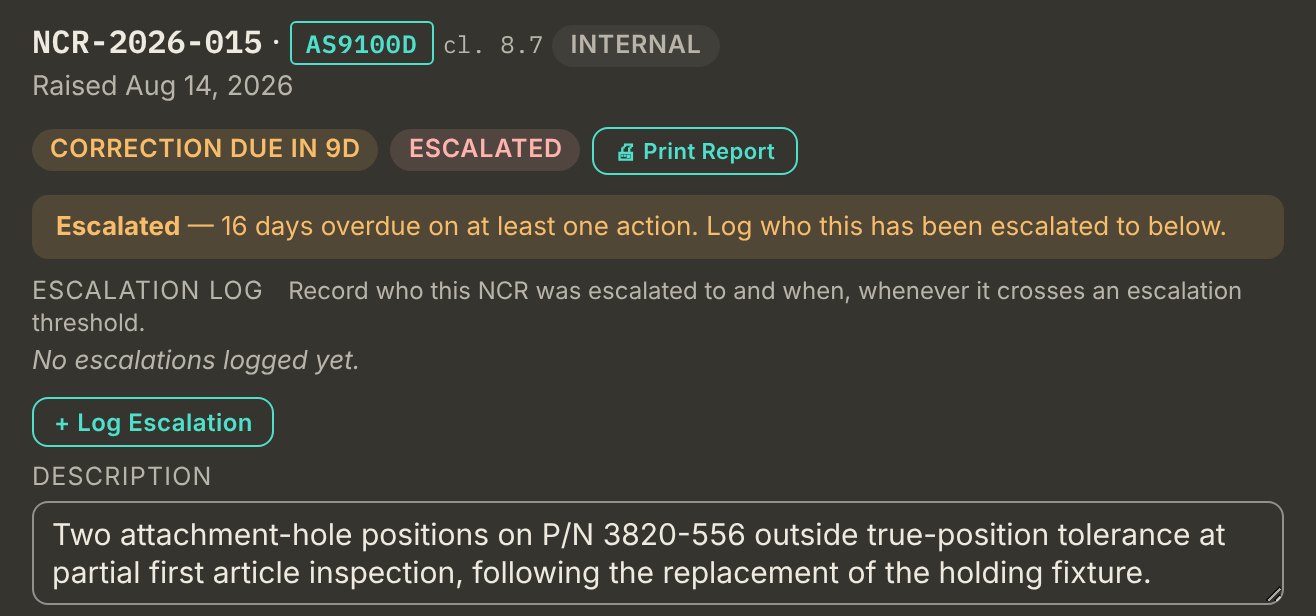
The header of NCR-2026-015 in JBird: raised August 14 against AS9100D clause 8.7, a correction-due countdown of 20 days, an overdue flag on the root-cause clock, an escalation log, and the description of two attachment holes out of true-position tolerance.The header of NCR-2026-015 in JBird: raised August 14 against AS9100D clause 8.7, a correction-due countdown of 20 days, an overdue flag on the root-cause clock, an escalation log, and the description of two attachment holes out of true-position tolerance.
One NCR, both clocks running in its header. Click to enlarge.
Video · 0:39A narrated walkthrough of this screen: One nonconformance, with its clocks and escalation.
Read the narration

This is the header of one nonconformance in JBird, raised August fourteenth against clause 8.7. The header shows a correction-due countdown and an escalated flag. The banner says how many days overdue an action is, and asks who it was escalated to. The escalation log records who the nonconformance was escalated to, and when, whenever it crosses an escalation threshold. And the description: two attachment-hole positions outside true-position tolerance. Due dates and escalation, built in. JBird QMS.

One view

Readiness across all three sector scopes.

Every figure on the dashboard is computed from real records — open findings against their deadlines, equipment against its calibration log, audits against their planned dates. Nothing here is a number somebody typed in.

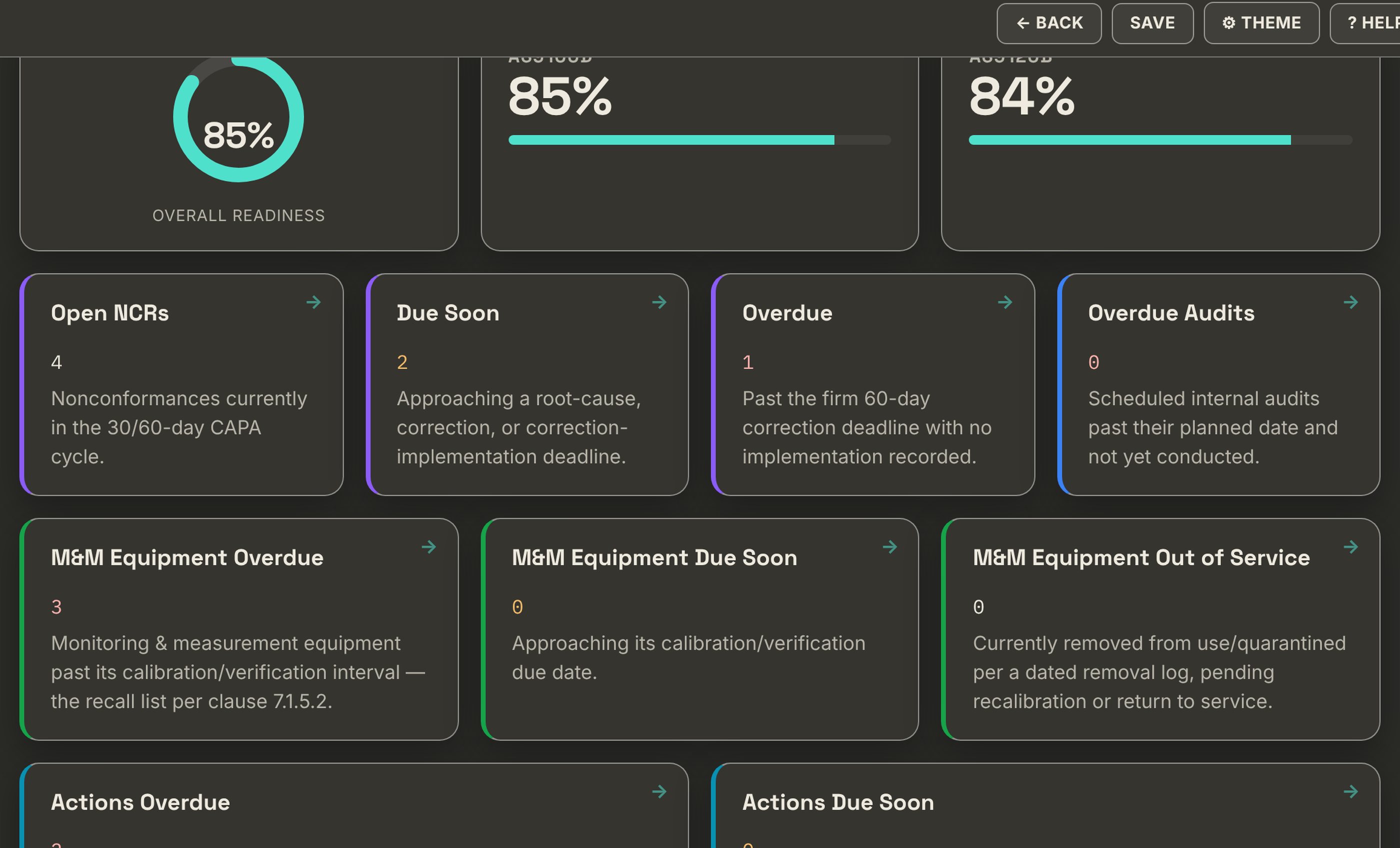
The JBird dashboard: overall readiness and per-standard readiness for AS9100D,
                AS9120B and AS9110C, plus open NCRs, items due within ten days, overdue items,
                overdue audits and calibration recall counts.The JBird dashboard: overall readiness and per-standard readiness for AS9100D,
                AS9120B and AS9110C, plus open NCRs, items due within ten days, overdue items,
                overdue audits and calibration recall counts.
Video · 0:40A narrated walkthrough of this screen: The dashboard, computed from real records.
Read the narration

This is the JBird dashboard. Every figure on it is computed from real records. Nothing here is a number somebody typed in. Overall readiness, and readiness for each standard that applies to you. Open nonconformances. What is coming due. What is already overdue. And any internal audit past its planned date. Monitoring and measurement equipment past its calibration interval, due soon, or removed from service. That is your recall list, under clause 7.1.5.2. Computed from your records, not typed in. JBird QMS.

See it in motion

Six short videos. One audit question each.

Each one starts with a question that comes up in an audit and shows how JBird answers it, in about a minute. Narrated, with the screen text on it, and shown with sample data in a demo environment.

Audit readiness

Video · 0:48Audit coming up? Is your QMS ready?
Read the narration

Audit coming up? Is your QMS ready? Stop chasing clauses across folders and spreadsheets. JBird puts it all in one system, with every module mapped to the clauses it satisfies. The dashboard shows readiness for each standard in one view, plus open nonconformances and overdue items. Gap analysis lists every clause with its live status, owner, documents, and linked processes. The quality manual shows each requirement, then how you meet it, drafted from your approved documents. JBird QMS. Built for aerospace quality.

Suppliers

Video · 0:38An auditor asks: how do you approve your suppliers?
Read the narration

An auditor asks: how do you approve your suppliers? Every external provider has its own record in one register, with standard terms you write once and attach to every purchase order. Each record shows approval status, scope of approval, who decided, and when. It records the verification you apply to what they deliver, and tracks counterfeit parts prevention. A log of performance reviews, and the supplier's nonconformance history, sit right on the record. One register, ready when the auditor asks. JBird QMS.

Documents and records

Video · 0:45Is that the current revision?
Read the narration

Is that the current revision? In JBird, every procedure, work instruction and form belongs to a process, so it inherits that process's owner and team. The owner approves it first, and again every time it changes. Each approval logs who signed off and when, and reopens the training checklist. You can start from pre-written templates, such as the internal audit, NCR and CAPA, and document control procedures. Then records retention takes over. It sets how long superseded revisions are kept, and shows what is eligible for disposition. Current documents, a clear history, and proof of control. JBird QMS.

Nonconformances

Video · 0:40Two corrective actions are past due. Do you know which ones?
Read the narration

Two corrective actions are past due. Do you know which ones? JBird works out every due date live, and lists what is overdue right on the dashboard. When an action passes your escalation thresholds, it surfaces for someone to acknowledge, with days overdue and who it is assigned to. The tracker shows what is open, what is overdue, and the status of every nonconformance. From here you can open a Pareto chart by defect category, the timeline of an NCR, and your escalation policy. Every date, worked out for you. JBird QMS.

Customer orders and contract review

Video · 0:53A customer emails a part number and a quantity. No purchase order. Now what?
Read the narration

A customer emails a part number and a quantity. No purchase order. Now what? In JBird, an order can come from a won quote, or be logged fresh. With no formal PO, you set the intake method, record what the order was based on, and attach the email itself. That is the evidence clause 8.2.3.1 asks you to keep. And every order, repeat orders included, gets a contract review before you commit. The review checks the customer's stated requirements, anything necessary but unstated, your own requirements, and statutory ones. It keeps the decision. If requirements change later, it is re-reviewed as a numbered amendment, and the original stays locked. From the first email to a retained decision. JBird QMS.

Risk and continual improvement

Video · 0:42How do you show you are improving, not just fixing problems?
Read the narration

How do you show you are improving, not just fixing problems? In JBird, each risk or opportunity has an owner, a planned action, and the process that addresses it. An effectiveness review log shows whether the action worked, and keeps management review's input current. Continual improvement pulls candidates live, from management review outputs and your analysis and evaluation log. One click tracks a candidate as an improvement item, with its own status and a repeatable effectiveness review. So improvement is monitored over time, not just incident by incident. JBird QMS.

What's coming

The 9100 series is being revised. Twice.

The IAQG is renaming and revising the aerospace standards alongside the new edition of ISO 9001 — as two separate revisions, not one. Every certified organization transitions, and a QMS that lives in Word documents transitions the hard way.

Worth knowing

The transition window has not been announced, and the published estimates disagree — anywhere from one year to three. Aerospace transitions have historically run shorter than the three years ISO allows. Plan for less time than an ISO transition would give you, and treat any specific deadline you read online as an estimate until the IAQG says otherwise.

Clause structure is data in JBird rather than something hard-coded, so a revision is a content update and your existing clause work maps forward. Read the full 2026 changes guide →

Plain-English guides

The audit forms, flow-downs and certification rules people get stuck on.

Short explainers on the documents that come up most, each answering one question completely.

AS9101 · Form 3

The PEAR, explained

What the Process Effectiveness Assessment Report asks for, and where each field comes from.

Read the guide →

AS9101 · Form 2

The process matrix and its four marks

C, N, N/E and N/A, and how they differ from both the (A), (B), (C) applicability letters and the 1 to 5 effectiveness level.

Read the guide →

Process map

How many processes should a QMS have?

There is no required number. A small manufacturer often lands around five to eight, and here is the test for what deserves its own process.

Read the guide →

D6-82479

Boeing's supplier QMS requirements

Which appendix applies to you, what Boeing expects from your certification, and the fourteen requirements on top of the standard.

Read the guide →

Form X31764

Boeing's quality purchasing data

What flows down to a sub-tier, what doesn't, and the four items that need a process rather than a signature.

Read the guide →

AS9104/1A

The certification scheme

What the 2022 rules changed for a certified shop: 90-day data, risk-based audit days, remote limits and site structures.

Read the guide →

Built by an auditor Not by a software team guessing at what a finding looks like.
Aerospace first AS9100D, AS9120B and AS9110C are the design target, not a plugin.
Sized for real shops For organizations too small for an enterprise QMS platform and too serious for a spreadsheet.

Why we're building it

“I spend my working life on the other side of the audit table. The same gaps come up again and again — not because these shops run bad quality systems, but because the system is scattered across a dozen files and nobody can see all of it at once.”

JBird is what I kept wishing the organizations I audit already had. — Founder, Quality Management Veteran’s, Inc.

Pilot program

We're looking for a handful of shops to build this with.

46 modules are already built and working. Pilot organizations get the system at no cost during development, direct input on what gets built next — there is a Report a Problem button on every screen, and it goes to a register we work through — and a migration path when the IA9100 revision lands.